Yhjhhhhnn
Jjjjjjjkkkkk
Jjjjjjjjjjjj
Jjjjjjjjjjjjjjkjk
Hhhuuyuujjjjjj
Hjjjjjjjjjjjjjjj
Hhjjjjjjjjjjj
Jjjjjjuuuu
Jjjjjjuu
Hhhhhhh
Hhh
Hhhhh
Hhhhh
Nnnnn
Hh+
Hhhhhhh
Hhhhhh
Jjjjjjj
Hhhhhhhh
Jjjhhjj
Hhhhhhjjj
Jjjjjjjj=j
Jjjjjj
Hhjjj
Hhjjjj
Jjjjj
Uuuuuu
Hhhhhh
Hgghhh
Hhhhhh
Hhhhh
Hhhh
Hhhhh
Ggg
Jjjjjjjjjjjj
Jjjjjjjjjjjjjjkjk
Hhhuuyuujjjjjj
Hjjjjjjjjjjjjjjj
Hhjjjjjjjjjjj
Jjjjjjuuuu
Jjjjjjuu
Hhhhhhh
Hhh
Hhhhh
Hhhhh
Nnnnn
Hh+
Hhhhhhh
Hhhhhh
Jjjjjjj
Hhhhhhhh
Jjjhhjj
Hhhhhhjjj
Jjjjjjjj=j
Jjjjjj
Hhjjj
Hhjjjj
Jjjjj
Uuuuuu
Hhhhhh
Hgghhh
Hhhhhh
Hhhhh
Hhhh
Hhhhh
Ggg
From the desk of ugwuanyi Kevin obinna
Ceo/owner of netblog.com.ng
WELCOME NOTE:
........... Good day dear reader, my name is ugwuanyi Kevin obinna

You can reach me through any of the following
details for any personal questions. Best Regards!
Contact me on
Facebook: ==> https://web.facebook.com/ugwuanyikevin.ugwuanyiobinna.9
Mobile: +2348111844950 or 08089769749
COPYWRITE:
Every part of this book is knowledge based and
remains a property of Ugwuanyi Kevin obinna
and should in no wise be sold or copied or transformed in any form, electronicaly, or in hard copy without getting permission from me (the author), otherwise, the person will be held responsible for any damage.
ALSO NOTE THAT some IMAGES FOUND HERE
ARE NOT FROM ME WHEN CREATING MY ACCOUNT, BUT
FROM FRIENDS AND BOSS.
How To Create A South Africa PayPal Account That Send And Receive Fund In Nigeria
We all know that Nigerian PayPal account do not receive fund but can only send fund, this makes it difficult for it to be used for online businesses aside for paying for goods and services.
I have thought about this a lot so I decided to research on it and discovered a way out and this is the use of
South Africa PayPal Account
which has the full PayPal feature, which simply means that you can send and receive fund as well as do other things a foreign PayPal can do.
South Africa PayPal Account
which has the full PayPal feature, which simply means that you can send and receive fund as well as do other things a foreign PayPal can do.
So let just go straight to the point on how to open South Africa PayPal Account. Click on this link here⤵️
https://www.paypal.com/za/webapps/mpp/merchant
And that is the one of the secret,
Therefore, you can copy and paste this link address in your browser. When you do that this is what the page you will see will look like the below image.

Then you have to click "login" after loading you cclick on SIGNUP then
When you are on the page you have to choose business, because we are opening a business account and which is the account that has the full PayPal feature we want. Therefore click on Signup and then select business account on the next page as shown in the image below and then click continue when that is done.
When you are on the page you have to choose business, because we are opening a business account and which is the account that has the full PayPal feature we want. Therefore click on Signup and then select business account on the next page as shown in the image below and then click continue when that is done.
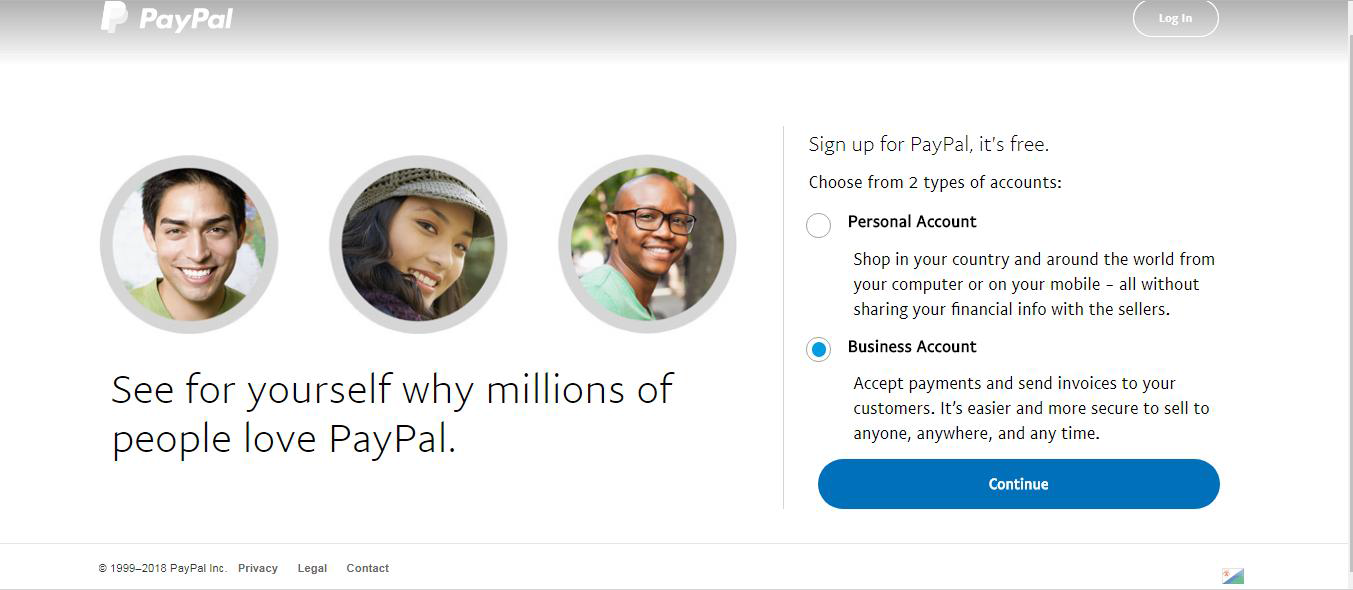
After that is done you will then be taken to the next page where you will be required to provide your email address as shown in the image below. It’s best if you open a fresh verified Gmail for the purpose of opening this account. Enter your email address there and then click on continue…
NB: Please it’s advisable to use a Gmail account or a custom email address if you have one, avoid yahoo mail at any cost.
When you enter the email address, click on next and you will then be taken to the next page.

On the next page you will be required to input your personal information and also your business information. Don’t worry about the business info but ensure you are using your real name as it is on your document here.
EMAIL ADRESS FIELD
Therefore in the email field, you enter the email address we want to use to open the PayPal account and then enter and re-enter the desired password.
BUSINESS INFORMATION FIELD
On the business information area, where you are asked for legal names input your original first name and last name there.
For the business name you can put any business name you wish to use there, it doesn’t matter whether you registered it or not, in my case I just put my business name NETBLOG.
PHONE NUMBER FIELD
Where you are asked for telephone number, click the dropdown option from South Africa as i pointed my arrow their and change it to Nigeria which is +234 and then you enter your mobile number their, delete the very first zero that start phone number.
For example instead of 08054××××××, then remove the first zero and use 8054×××××××, and you then enter your address as it is on your local bank statement and the next thing is to select the primary currency you want the PayPal to use, in this case select USD and then tick I AGREE AND CONTINUE you now click Agree and Continue.
See the below image.

After you do this you will then be taken to the next page which is the tell us about your business page. In this page you will be required to tell them what type of business you want.
Just select individual you then select anything as category and subcategory here and then proceed you can omit the business URL option and leave blank if you Don’t have business website. In my case I used www.netblog.com.ng as my business URL.

INFORMATION PAGE
You then click on continue and you will then be taken to account holder information page where you will be required to provide an identification document for verification.
Put in Nigeria as your nationality, select the documents you wish to use and you enter the corresponding details there.
In my case I used my Nigeria voters card so I will select that from the drop down and provide the identification number and my original date of birth as it is on the ID Card. See image below:

Therefore next is to submit it by clicking submits as shown above. When you do that you will get to a page as displayed below asking you to confirm your email address to activate your account and then setup your payment.

You then log in to your email and click on the confirmation mail sent to your email.
When you click on the confirmation link sent to your email,
When you get the mail and click it you are going to be redirected to the login page where you need to enter your password and login to the PayPal account to make the verification successful

The next page will appear like the below image

Just click on it and the next page will appear like below image

NEXT is CARD VERIFICATION
It means that the email is verified and the next is to link and confirm your debit or credit card.
Click on the link and confirm debit or credit card
As shown on the above image
As shown on the above image
Click on it and you will then be taken to this page like below image, just select add a new card

After you clicked on add a new card then you see a page that will appear like below image:

Kindly fill in your card details, because most of Nigeria credit/debit cards are accepted either MASTER CARD or VISA CARD, and after filling in credit/debit card details, click on link card
When you do just that your bank account will be debited and depending on the bank you should get the debit immediately (alert) or in 24 hours.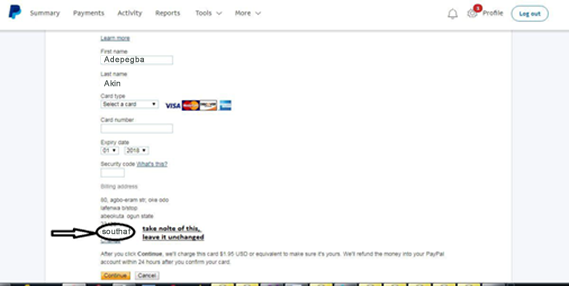
And the debit alert will be shown on your bank statement as seen below. You will then notice the word CODE written as part of the statement, the numbers before the word are the code you have to provide to verify your account.

Therefore when you have this code go back to the page where you are asked to provide it and supply the code and your account would then be verified. And you can start receiving and sending money right away.
IMPORTANT NOTES
- When you want to login always use this link
- https://www.paypal.com/signin?country.x=ZA&locale.x=en_ZA
- When you have any issue with your account you can call PayPal on this number +1-402-935-2050 with the number you registered the PayPal account with.
- Note that when calling them always ensure you have your unique one time passcode, you can get it here
- https://www.paypal.com/za/selfhelp/contact/call
- You can also use this link to link your debit/credit card to your PayPal
- https://www.paypal.com/businessprofile/mymoney
You can link extra email up to 5 to your PayPal account by using this link
- Dedicate a single browser on your phone or computer for paypal use only
- Avoid using your paypal to checkout on sites online, especially sites like ebay and the rest.
- Avoid creating invoices on PayPal as this can attract some unforeseen restriction on your account.
That’s all on how to open a South Africa PayPal Account that receive and send fund in Nigeria. Thanks for Reading.
EXCHANGE YOUR DOLLARS FOR NAIRA
To exchange your USD for Nigeria Naira you can Chat me up on Whatsapp ONLY +2348089769749 or message me on Facebook here: https://web.Facebook.com/ugwuanyikevin.ugwuanyiobinna.9 thanks.
Chat me up on Facebook ==> https://Facebook.com/ugwuanyikevin.ugwuanyiobinna.9
Join our Facebook group ==> Web.facebook.com/groups/Earningstrategy
WhatsApp: 08089769749
Call: 08111844950
Also, am from Enugu - ezike,
Igbo Eze North L.G.A,
ENUGU state, Nigeria.
My other services

Thank you all... .. .,Have a nice day....!
.
.
.
.
.
.
.
.
.
.
.
.
.
.
.
.
.
.
.
.
.
.
.
.
.
.
.......................................................................................